I built Local Crew because I wanted a system that could treat the machines already in my house like one coordinated AI environment instead of a pile of disconnected terminals.
That's the core idea: take the laptop, desktop, mini PC, and whatever else you already have on your network, register them as resources, and let one orchestrator handle routing, delegation, task flow, memory, and quality checks across the whole group. No cloud account required. No API keys unless you want to add them. Your hardware, your models, your data.
The source is on GitHub: github.com/benmcnulty/localcrew
Port matters here, and I'll cover it, but it isn't the main event. The main event is the local-first orchestration framework itself: a practical system for running real multi-device AI workflows on infrastructure you control.
What Local Crew Actually Is
Local Crew is a local-first orchestration harness for multi-device inference networks. The orchestrator sits in the middle, abstracts hardware behind named agent identities, and routes work to the best available resource based on capability, availability, memory headroom, and task complexity.
In practice, that means one system can coordinate:
- a strong top-tier machine for long-context reasoning and delegation
- mid-tier machines for the bulk of task execution
- smaller devices for fast classification, routing, and utility work
- optional OpenAI-compatible or Anthropic endpoints when you want them
The default path is still local inference. Ollama on your own network is the baseline. Everything else is additive.
What makes the framework useful is that it doesn't stop at model access. It also gives you:
- autonomous queue filling and task execution through
/auto - persistent system memory and per-agent memory across sessions
- resource discovery, topology management, and live capacity reporting
- a browser dashboard at
/uifor direct operator control - a wallboard at
/displayfor always-on visibility - transactional audit and telemetry so the system stays legible as it grows
That's the difference between a model runner and an orchestration framework. Local Crew is designed to manage ongoing work, not just answer prompts.
The Operator Experience Matters
The CLI is still the center of gravity, because I want the full system to remain operable from the terminal. But I also wanted the state of the system to be visible without forcing everything through text.
The local browser UI gives me a working control surface for resources, queue state, direct interactions, and configuration. It's the view I use when I want to inspect the system instead of talk to it.
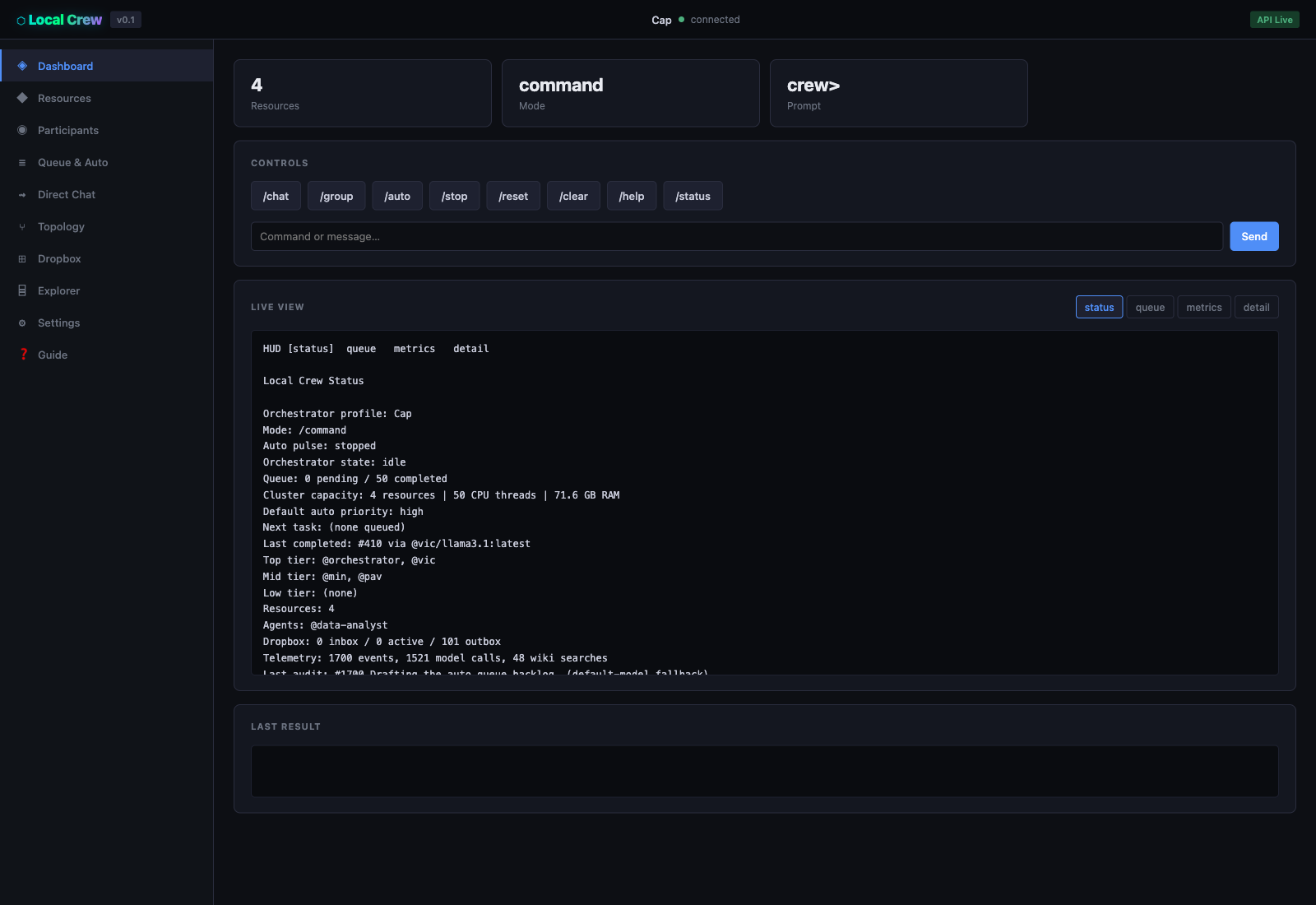
The /ui dashboard is the practical operator surface for local control.
The /display wallboard solves a different problem. It's for the monitor across the room, the TV on the wall, or the always-on secondary display that keeps the whole system legible while work is running.
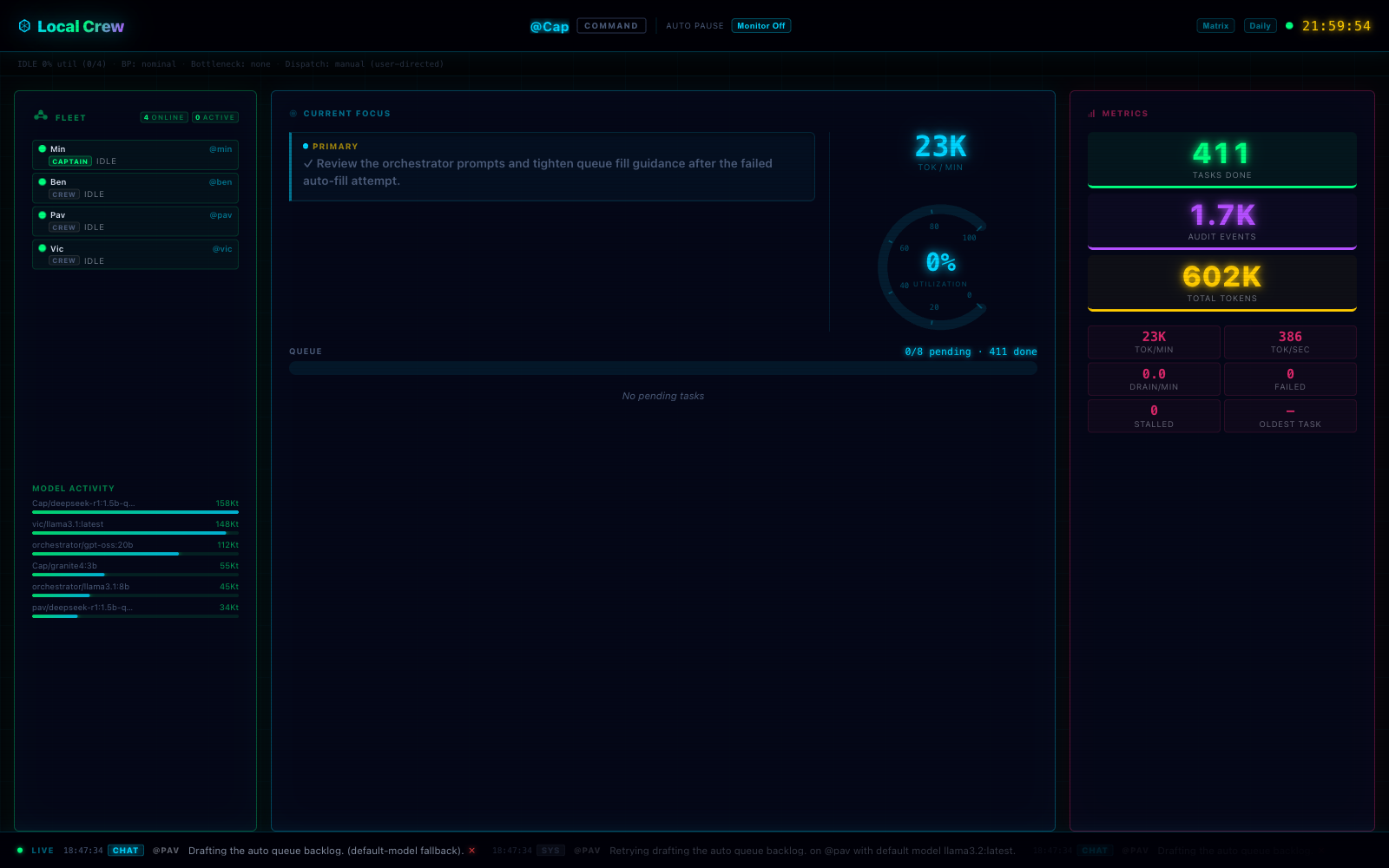
The /display wallboard turns the orchestrator into a visible live system instead of a hidden background process.
That split is intentional. I want the framework to work as both a deep operator tool and a glanceable status surface. If I'm going to trust a system with autonomous task execution, I need it to be inspectable.
Setup Is Intentionally Short
One of the main goals for Local Crew is to make the first useful run happen quickly.
On the primary machine, the setup is straightforward:
git clone https://github.com/benmcnulty/localcrew.git
cd localcrew
npm install
npm run setup:crew
That bootstrap flow discovers local models, writes the managed environment state, registers the primary resource, and starts the orchestrator in the same terminal.
Adding another machine follows the same pattern:
npm run setup:agentThe agent setup flow handles connection checks, device naming, model discovery, and sync back to the orchestrator. Once the network is online, the commands that matter are the ones you'd expect:
/status
/resource list
/topology
/auto
That setup story is important to me because too many "local AI" projects fall apart between the demo and the second machine. I wanted this one to be useful as a real framework, not just interesting as a proof of concept.
How The Orchestration Loop Works
The orchestration model is where Local Crew stops being a thin wrapper around local models and starts becoming an actual system.
Resources are organized into tiers. Top-tier devices can carry longer-context reasoning and even act as sub-orchestrators. Mid-tier devices handle the bulk of day-to-day work. Lower-tier devices can still be useful for fast lightweight tasks. The point isn't to pretend every machine is equal. The point is to use each one where it helps most.
When Local Crew enters /auto, it moves through a continuous loop:
- fill the queue through a draft-review-finalize consensus flow
- route tasks to the most appropriate available resource
- resolve tool use and file workflows as needed
- verify completed work for substance and goal alignment
- recover safely when something fails
That loop is what makes the framework feel different in practice. Instead of prompting one model over and over, you're operating a system that can generate work, distribute it, track it, and learn from the results over time.
The agent layer matters here too. Participants have names, instructions, model bindings, and their own memory. That lets the orchestrator work with stable roles instead of raw endpoint strings, which makes the whole environment easier to reason about.
Port Is The Companion Layer, Not The Product
Port is the remote-facing layer that sits beside the local system, not above it.
That's an important distinction. The local app stays fully functional on the LAN. /ui and /display are meant to be available locally out of the box. Remote authenticated access belongs in a separate surface, and that's where Port comes in.
Port gives Local Crew a public-facing identity layer: sign-in, a Captain handle, pairing, and a remote dashboard that can eventually accept authenticated task submission from outside the local network.
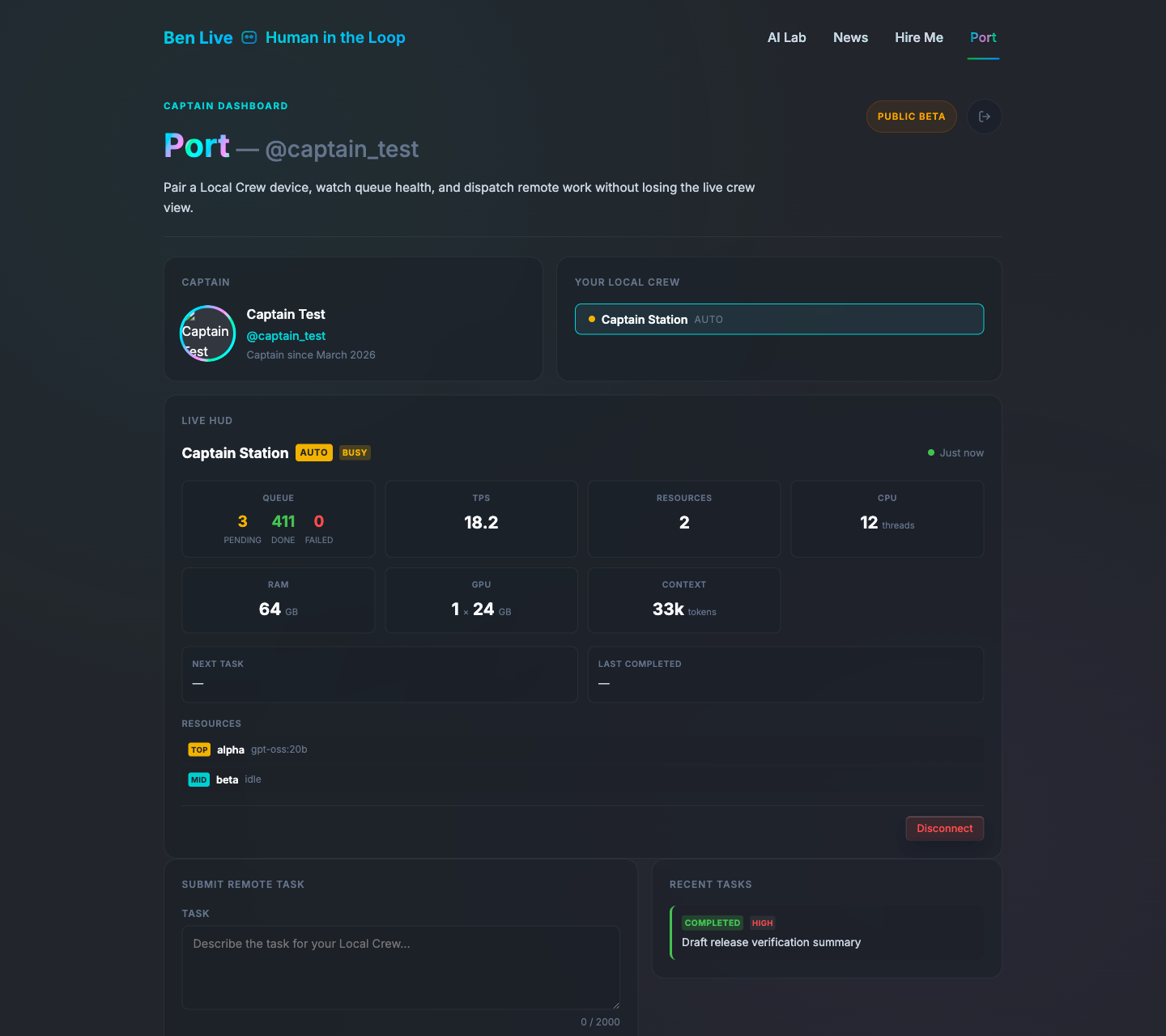
Port gives the orchestrator a remote identity and a public-facing dashboard without turning the local app into a cloud dependency.
The auth stack is pragmatic. I used Firebase Auth with Google Sign-In because I wanted low-friction onboarding, sane session handling, and reuse of infrastructure I already trust in the rest of benlive.tv. After sign-in, the user claims a Captain handle and pairs a Local Crew instance through a short-lived device token entered into the CLI with /login <token>.
That pairing flow matters, but it only makes sense because the local framework already exists. Port is useful precisely because the real application lives on your own machines first.
Why I Think This Model Matters
What I care about here is that Local Crew demonstrates a direction I think more AI systems should move toward.
I want AI infrastructure that is inspectable, composable, and owned by the person using it. I want orchestration that works across the hardware people already have instead of assuming every meaningful workflow has to be rented from somebody else's platform. I want the system to stay useful when the remote layer is unavailable.
That's the reason I keep the emphasis on the local framework. Port is a feature. Auth is a feature. The product is the orchestration environment itself.
If you want to try it, start locally first. Clone the repo, bootstrap the orchestrator, add a couple of devices, open /ui, put /display on a second screen, and run /auto. Once that local loop is real, Port starts making sense as the remote companion surface.
That's the architecture I wanted from the beginning: local-first, operationally legible, and practical enough to run real work on hardware I already control.